
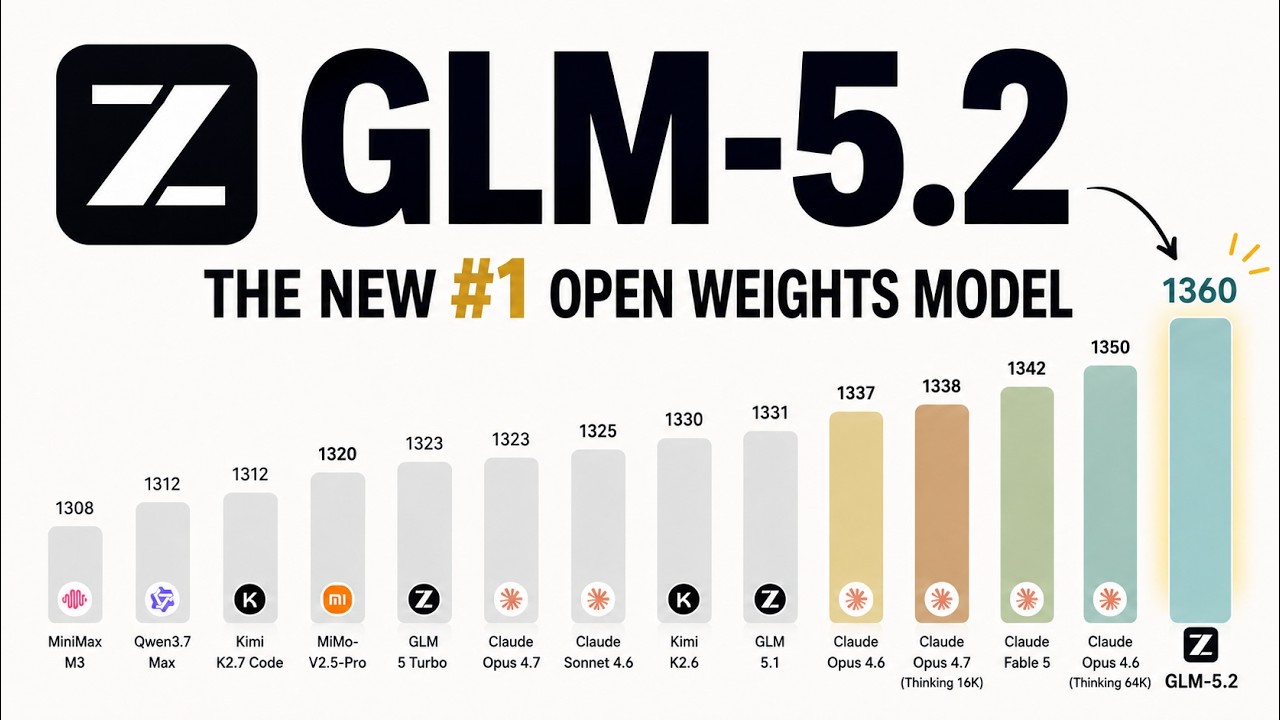
How to Run an AI model on your desktop or laptop without a special graphics card. A model that can beat the top paid models in 2026.
A 744B Parameter AI Model on Your Desktop: The Colibri Guide
By Khawar Nehal
Date : 15 September 2026
CEO & Founder, Applied Technology Research Center (ATRC) | Independent Technical & Strategic Advisor
For years, the prevailing dogma in enterprise AI has been rigid: if you want frontier-level intelligence, you must surrender to the cloud and pay premium rates for massive GPU clusters. Running a 700+ billion parameter model locally was considered physically impossible for standard hardware.
But a paradigm shift is underway. A new open-source project called Colibri is fundamentally challenging this assumption. Developed to leverage advanced Mixture-of-Experts (MoE) streaming, Colibri enables the execution of a 744-billion parameter model (such as optimized variants of GLM architectures) on standard consumer or enterprise desktop hardware—potentially even without a dedicated, high-end GPU.
As someone who has spent over three decades architecting IT infrastructure, advocating for open-source solutions, and emphasizing data sovereignty, I see Colibri not just as a technical novelty, but as a massive leap forward for Radical Transparency and private, ethical AI deployment.
Here is your comprehensive, step-by-step guide to installing and executing this “tiny engine, immense model” in your own environment.
The Architecture: How It Defies Traditional Limits
Before executing any code, it is critical to understand the underlying mechanics. Colibri does not attempt to load a 744B parameter model into your system RAM or VRAM, which would require terabytes of memory.
Instead, it utilizes an intelligent disk-to-RAM streaming architecture:
- On-Demand Expert Loading: Much like an operating system paging memory, Colibri streams specific “experts” (sub-networks of the model) from your high-speed storage directly into RAM only when required for a specific token generation.
- Memory Efficiency: It maintains only the active dense weights in memory (often under 12GB fluctuating between tokens), while the massive ~370GB+ model container resides securely on your local SSD.
- Zero External Dependencies: The core engine is written in pure C with OpenMP, aligning perfectly with the lean, efficient, and auditable principles of the Linux and open-source ecosystems.
Prerequisites
To ensure a stable and performant deployment, your environment must meet the following baseline requirements:
- Operating System: Linux ( For all hacking projects obviously. )
- Compiler: gcc with OpenMP support.
- CPU: Modern processor with AVX2 instruction set support.
- RAM: Minimum 16 GB (25 GB+ highly recommended for seamless context switching).
- Storage: ~400 GB of free disk space. The model container itself is roughly 370 GB.
- Drive Type: A fast NVMe SSD is recommended. Because the model constantly reads from disk, a traditional HDD will result in a huge amount of latency.
Part 1: Installation Procedure
The beauty of Colibri lies in its minimalist footprint. The engine itself is remarkably lightweight.
Step 1: Clone the Repository
Open your terminal and clone the official Colibri repository.
git clone https://github.com/JustVugg/colibri
cd colibri/c
Step 2: Acquire the Model Container
You must download the specific quantized model container (e.g., GLM-5.2-colibri-int4 or the latest equivalent from the project’s Hugging Face registry).
- Action: Download this directory to your fastest local NVMe drive.
- Note: Ensure the model files are placed in the directory path expected by the Colibri configuration (usually a /models or /weights subdirectory, as defined in the project’s README.md).
Step 3: Compile the Engine
Because the codebase is pure C, compilation is straightforward and does not require complex Python virtual environments or heavy dependency trees.
make
(If the repository provides a specific build script, e.g., ./build.sh, execute that instead to handle environment-specific optimizations).
Part 2: Execution Procedure
Once compiled, Colibri offers two primary execution modes tailored to different use cases: interactive terminal chat and local API server deployment.
Option A: Interactive Chat Mode (Testing & Validation)
For immediate validation and prompt engineering directly in your terminal:
- Navigate to your compiled Colibri directory.
- Execute the chat binary:
./coli chat
- The engine will initialize, mapping the necessary experts into RAM. You can now input prompts and observe the model’s reasoning capabilities in real-time.
Option B: Local Server Mode (Enterprise Integration)
This is where Colibri delivers immense business value. You can transform your desktop or private server into a fully local, OpenAI-compatible AI endpoint. This ensures absolute data sovereignty—no prompts or proprietary data ever leave your network.
- Start the local server:
./coli serve
- Integrate with Your Tools:
Colibri exposes a local REST endpoint that mimics the standard OpenAI API structure.- Base URL: http://localhost:8000/v1 (verify the exact port in your terminal output).
- API Key: sk-local-no-key-required (or as configured).
You can now point local development tools (like Cursor or Windsurf), custom Python scripts, or internal enterprise applications directly to your Colibri instance. This provides a “zero-token-cost” API with guaranteed privacy.
Performance Expectations & Strategic Considerations
As a strategic advisor, I must emphasize Radical Transparency regarding performance:
- Throughput vs. Latency: Because Colibri streams from disk, tokens-per-second (TPS) will be lower than a model fully resident in GPU VRAM. However, for asynchronous tasks, document analysis, or local coding assistance, the latency is entirely acceptable.
- Capability: Early benchmarks suggest that heavily optimized 700B+ parameter models running via this method can rival top-tier proprietary models in complex reasoning, coding, and logical deduction tasks.
- Hardware Longevity: This approach dramatically extends the useful life of existing enterprise hardware, delaying costly GPU upgrade cycles and promoting sustainable IT practices.
Conclusion
Colibri represents a democratization of frontier AI. By decoupling model size from strict VRAM requirements, it empowers developers, researchers, and businesses to deploy state-of-the-art intelligence on affordable, accessible hardware.
For organizations prioritizing data protection, ethical governance, and long-term cost efficiency, local, disk-streamed AI is no longer a theoretical concept—it is a deployable reality.
I encourage my peers in the IT, cybersecurity, and software development communities to test this architecture, validate its capabilities, and explore how it can be integrated into secure, private cloud solutions.
For further discussions on secure AI deployment, Linux infrastructure, or strategic IT/ICT partnerships, feel free to reach out via my official channels at ATRC.
Happy hacking.
— Khawar Nehal
